Your learners complete a course and receive nothing they can show for it. Maybe they download a generic PDF, lose it in a folder, and when an employer or compliance auditor asks for proof — they have nothing. Meanwhile, your admin team is manually creating certificates in Canva or Word, one at a time. Certificate & Verify fixes this by automating the entire process and adding a public verification layer that makes your credentials credible.
What It Does
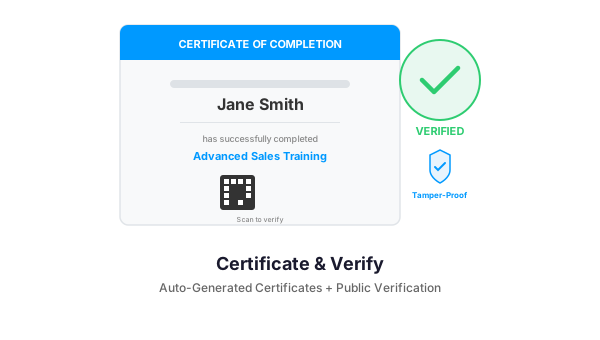
When a learner completes a course or passes a quiz in LearnDash, the plugin automatically generates a branded certificate with their name, course title, completion date, and a unique verification code. Each certificate gets its own public URL and QR code. Employers, HR departments, or compliance officers can visit that URL or scan the QR code to instantly verify the certificate is real, current, and untampered.
Key Features
Automatic Certificate Generation
Certificates are created the moment a learner completes a course or passes a quiz. No admin action needed. The plugin pulls the learner name, course title, completion date, and instructor name directly from LearnDash and populates a customizable template.
Public Verification Page
Each certificate gets a unique URL on your site — something like yoursite.com/verify/ABC123. Anyone with that link can see the certificate details, confirm it was issued by your organization, and check that it has not expired. No login required for verification.
QR Code Integration
Every certificate includes a dynamically generated QR code that links to its verification page. Learners can print the certificate or share the QR code digitally. Auditors scan it with their phone and get instant confirmation.
Customizable Certificate Templates
Upload your logo, choose brand colors, add signature images, and configure which fields appear on the certificate. Support for multiple templates — different certificates for different courses or programs. All controlled from the WordPress admin.
Expiration and Renewal
Set certificates to expire after a defined period — 1 year, 2 years, custom. When someone checks a verification page for an expired certificate, it shows as expired with a prompt to renew. Automated email reminders notify learners before expiration. Built for industries where recertification is mandatory.
PDF Download and Email Delivery
Learners can download their certificate as a high-quality PDF from their LearnDash profile. The plugin also emails the certificate automatically on completion. Admins can resend or bulk-export certificates from the dashboard.
Who It Is For
- Law enforcement and public safety academies that need verifiable POSTC training records
- Healthcare and continuing education providers issuing CE credits that must be validated
- Corporate L&D teams running compliance training where proof of completion is required
- Professional certification bodies that need tamper-proof digital credentials
- Any LearnDash site that wants to add credibility and professionalism to their course offerings
Requirements
- WordPress 6.0+
- LearnDash LMS (course and quiz completion triggers)
- PHP 7.4+ (for QR code generation)
- Optional: WP Mail SMTP (for reliable email delivery of certificates)
Get Started
Stop sending generic PDFs that anyone could fake. Give your learners credentials that employers actually trust — with one-click verification that proves they earned it. Contact us to add Certificate & Verify to your LearnDash platform.
Need a Custom LearnDash Solution?
We build WordPress plugins and integrations for LearnDash-powered training platforms. Let us know what you need — from custom reporting to mobile app bridges.